What the assistants can do
Every object below is read and written in your Fishbowl Advanced instance through Aquarium® and the Fishbowl Advanced API. Every change is a staged preview you approve before Fishbowl is touched. If a request is not on this page, the assistant tells you so instead of guessing.
Orders and records
| Object | Query | Create | Edit | Issue | Unissue | Void or delete | Deactivate | Start | Finish | Memos and notes |
|---|---|---|---|---|---|---|---|---|---|---|
| Purchasing | ||||||||||
| Part | LiveQuery, including vendor part numbers and vendor costs | Live, staged for your approval | Live, staged for your approval | Not applicable | Not applicable | Not applicable | Live, staged for your approval | Not applicable | Not applicable | Live, staged for your approvalView and edit |
| Inventory | LiveQuery on hand by location | Not applicable | Not applicable | Not applicable | Not applicable | Not applicable | Not applicable | Not applicable | Not applicable | Not applicable |
| Vendor | Live | Live, staged for your approval | Live, staged for your approvalEdit, including vendor part numbers | Not applicable | Not applicable | Not applicable | Live, staged for your approval | Not applicable | Not applicable | Live, staged for your approvalView and edit |
| Bid request | Live | Live, staged for your approval | Live, staged for your approval | Live, staged for your approvalIssue as a purchase order | Not applicable | Not applicable | Not applicable | Not applicable | Not applicable | Not applicable |
| Purchase order | Live | Live, staged for your approval | Live, staged for your approval | Live, staged for your approval | Live, staged for your approval | Live, staged for your approvalDelete unissued, void issued | Not applicable | Not applicable | Not applicable | Live, staged for your approvalView and edit |
| Blanket purchase order | Live | Live, staged for your approvalCreate with scheduled releases | Live, staged for your approval | Not applicable | Not applicable | Not applicable | Not applicable | Not applicable | Not applicable | Not applicable |
| Sales | ||||||||||
| Product | Live | Live, staged for your approval | Live, staged for your approval | Not applicable | Not applicable | Not applicable | Live, staged for your approval | Not applicable | Not applicable | Not applicable |
| Customer | Live | Live, staged for your approval | Live, staged for your approval | Not applicable | Not applicable | Not applicable | Live, staged for your approval | Not applicable | Not applicable | Live, staged for your approvalView and edit |
| Quote (sales order in Estimate status) | Live | Live, staged for your approval | Live, staged for your approval | Live, staged for your approvalIssue as a sales order | Not applicable | Live, staged for your approvalDelete | Not applicable | Not applicable | Not applicable | Not applicable |
| Sales order | Live | Live, staged for your approval | Live, staged for your approval | Live, staged for your approval | Not applicable | Not applicable | Not applicable | Not applicable | Not applicable | Live, staged for your approvalView and edit |
| Manufacturing | ||||||||||
| Bill of materials | LiveQuery, full tree view and where-used | Not applicable | Coming, staged for your approval | Not applicable | Not applicable | Not applicable | Not applicable | Not applicable | Not applicable | Not applicable |
| Manufacture order | Q4 2026 | Q4 2026, staged for your approval | Q4 2026, staged for your approval | Not applicable | Not applicable | Q4 2026, staged for your approvalVoid | Not applicable | Q4 2026, staged for your approval | Q4 2026, staged for your approval | Not applicable |
| Work order | Q4 2026 | Q4 2026, staged for your approval | Q4 2026, staged for your approval | Not applicable | Not applicable | Q4 2026, staged for your approvalVoid | Not applicable | Q4 2026, staged for your approval | Q4 2026, staged for your approval | Not applicable |
Purchasing
Part
- Query, including vendor part numbers and vendor costsQueryLive
- CreateLive, staged for your approval
- EditLive, staged for your approval
- DeactivateLive, staged for your approval
- View and editMemos and notesLive, staged for your approval
Inventory
- Query on hand by locationQueryLive
Vendor
- QueryLive
- CreateLive, staged for your approval
- Edit, including vendor part numbersEditLive, staged for your approval
- DeactivateLive, staged for your approval
- View and editMemos and notesLive, staged for your approval
Bid request
- QueryLive
- CreateLive, staged for your approval
- EditLive, staged for your approval
- Issue as a purchase orderIssueLive, staged for your approval
Purchase order
- QueryLive
- CreateLive, staged for your approval
- EditLive, staged for your approval
- IssueLive, staged for your approval
- UnissueLive, staged for your approval
- Delete unissued, void issuedVoid or deleteLive, staged for your approval
- View and editMemos and notesLive, staged for your approval
Blanket purchase order
- QueryLive
- Create with scheduled releasesCreateLive, staged for your approval
- EditLive, staged for your approval
Sales
Product
- QueryLive
- CreateLive, staged for your approval
- EditLive, staged for your approval
- DeactivateLive, staged for your approval
Customer
- QueryLive
- CreateLive, staged for your approval
- EditLive, staged for your approval
- DeactivateLive, staged for your approval
- View and editMemos and notesLive, staged for your approval
Quote (sales order in Estimate status)
- QueryLive
- CreateLive, staged for your approval
- EditLive, staged for your approval
- Issue as a sales orderIssueLive, staged for your approval
- DeleteVoid or deleteLive, staged for your approval
Sales order
- QueryLive
- CreateLive, staged for your approval
- EditLive, staged for your approval
- IssueLive, staged for your approval
- View and editMemos and notesLive, staged for your approval
Manufacturing
Bill of materials
- Query, full tree view and where-usedQueryLive
- EditComing, staged for your approval
Manufacture order
- QueryQ4 2026
- CreateQ4 2026, staged for your approval
- EditQ4 2026, staged for your approval
- VoidVoid or deleteQ4 2026, staged for your approval
- StartQ4 2026, staged for your approval
- FinishQ4 2026, staged for your approval
Work order
- QueryQ4 2026
- CreateQ4 2026, staged for your approval
- EditQ4 2026, staged for your approval
- VoidVoid or deleteQ4 2026, staged for your approval
- StartQ4 2026, staged for your approval
- FinishQ4 2026, staged for your approval
That is the Fishbowl side. The Planner adds objects of its own, computed from your Fishbowl data. See the Planning objects below ↓
Planning
The Planner's objects are Aquarium's own, computed from your Fishbowl Advanced data and recomputed every time an input changes. Query and edit them in the View or in chat; only Commit writes back to Fishbowl, and only after you approve it.
| Object | Query | Edit | Commit to Fishbowl |
|---|---|---|---|
| Backlog | Live | LiveSet priority and desired build date | Live, staged for your approval |
| Production schedule | Live | LiveMove the scheduled build date | Live, staged for your approval |
| Alerts | Live | Not applicable | Not applicable |
| Hot parts | Live | Not applicable | Not applicable |
| Buying plan | Live | LiveInclude or exclude parts | Live, staged for your approvalDrafts purchase orders through the Buyer |
Backlog
- QueryLive
- Set priority and desired build dateEditLive
- Commit to FishbowlLive, staged for your approval
Production schedule
- QueryLive
- Move the scheduled build dateEditLive
- Commit to FishbowlLive, staged for your approval
Alerts
- QueryLive
Hot parts
- QueryLive
Buying plan
- QueryLive
- Include or exclude partsEditLive
- Drafts purchase orders through the BuyerCommit to FishbowlLive, staged for your approval
Who can do what
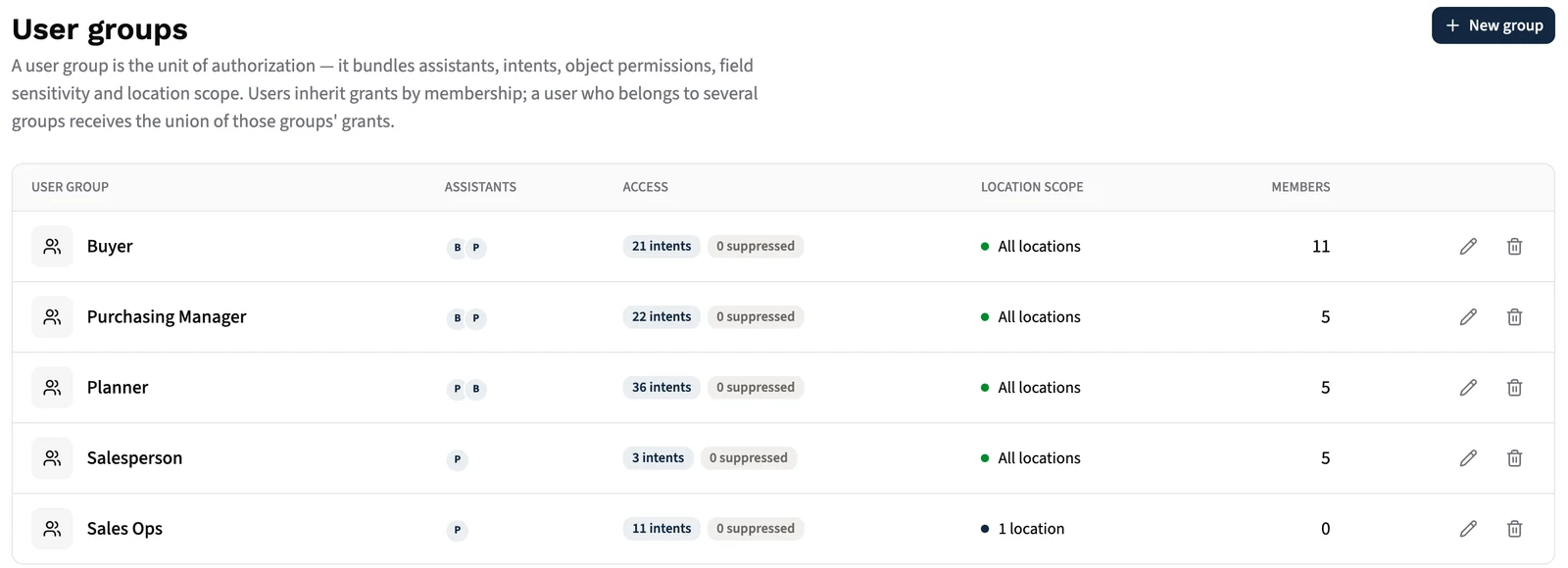
Access in Aquarium is set per user group. A group grants access to assistants, to the intents within each assistant (the workflows its members can run), and permits or restricts sensitive data; it can also be limited to Fishbowl locations. People inherit what their groups grant; someone in two groups gets both. Four standard groups come with every account. Change them, drop them, or create your own.
| Standard group | Assistants | What it is for |
|---|---|---|
| BuyerBuyer, Planner | Buyer, Planner | Day-to-day purchasing: drafts and revises purchase orders, bid requests, vendors and parts, and reads the plan. |
| Purchasing ManagerBuyer, Planner | Buyer, Planner | Everything a Buyer does, plus issuing purchase orders to Fishbowl. |
| PlannerPlanner, Buyer | Planner, Buyer | Demand, reorder plans and the production schedule; releases planned orders. |
| SalespersonPlanner | Planner | Read-only view of sales orders and availability. |
User groups are in every bundle, including free Query, for the assistants that bundle includes. The standard groups are a starting point, not a limit.
Intents
Each assistant exposes a set of intents, the workflows a group may run. Grants are per intent, not per table: drafting a purchase order and issuing it are separate intents, so one group can prepare orders that only another group can send to Fishbowl.
Sensitive data
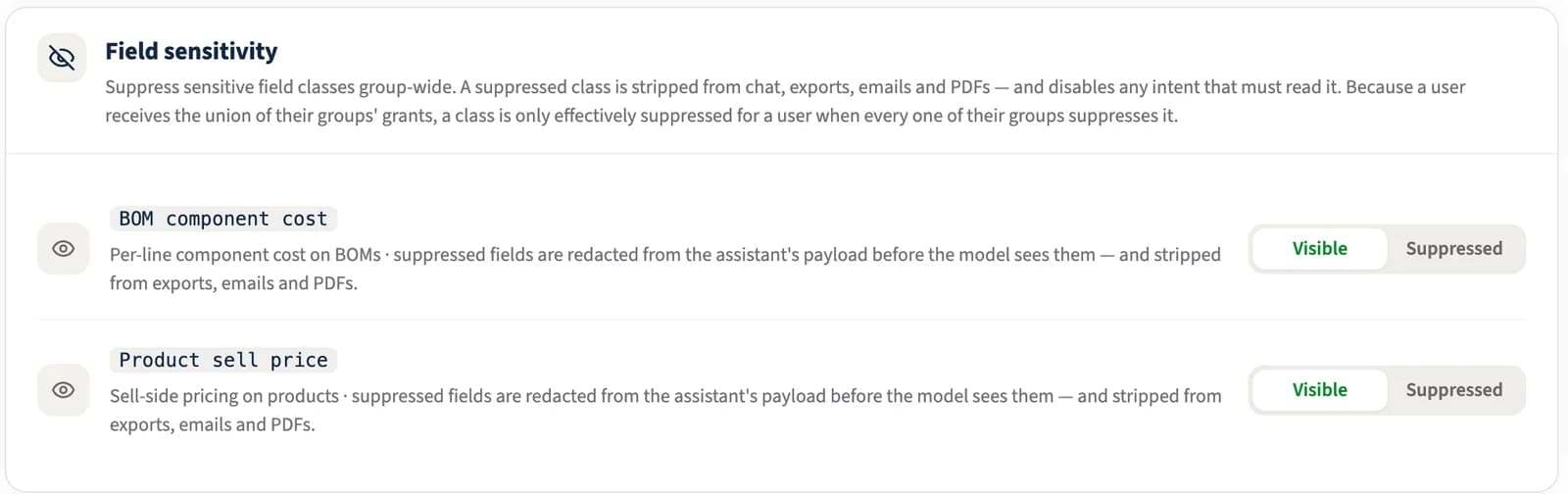
Permit or restrict sensitive field classes per group, such as BOM component cost or product sell price. Restricted fields are redacted before the model sees them and stripped from chat, exports, emails and PDFs.
Location scope
Limit a group to the location groups already defined in Fishbowl. Location groups are managed in Fishbowl, not in Aquarium.
On the roadmap
Receiving against purchase orders with lot and serial capture, lot and serial reporting, inventory adjustments, moves and cycle counts, transfer orders, reconciliation, credit return sales orders, pick and ship, and RMA purchase orders are planned. Dates are published here when each is scheduled.
Not planned
Payments, invoicing and accounting stay in Fishbowl and your accounting system. The assistants do not create or edit them.
The assistants read users, permissions, custom fields, pricing rules and accounting data to answer questions. They never write to them.
Put the assistants to work on your Fishbowl Advanced data.
Reserve a spot before paid subscriptions open on November 30, or start free on the Query bundle. Every change on this page is staged for your approval first.